Tables
The table module is used for all data that is needed but does not fit in any of the other modules. In tables you can store data in a similar way as in an excel file or a regular database table.
There are two types of tables:
- Global Tables
- Local Tables
Global tables
Global tables are defined under Global - Tables. The global table definition works as a template that is added to the desired products. In this way, it is guaranteed that all products follow the same template. Global tables is the preferred way to do when working with tables. Global tables also makes it possible to validate product data across several products.
Table groups
The global tables are grouped in table groups. A table group can contain one or more tables. In this way it is easy to set up a group of tables that are used on many products. On the product just add the desired table group to the product and all tables from the group are added in one click.
Local tables
It is possible to create a local table that only exists on the product where it is created.
Import tables with blob columns.
If one or several table columns are defined as blob then table data can be imported using a .zip file containing the data plus the blob files.
The zip-filen shall contain:
- An excelsheet named table.xlsx.
- All binary files.
The excelsheet ”table.xlsx” shall contain all the columns according to the table defintion. The cells representing the blob files shall contain the name of the blob files that are contained in the zip-file.
Excel-file example:
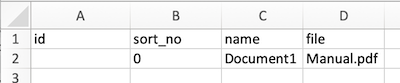
Note! If you export the table the "blob"columns are not exported. You need to manually add the blob columns in the excel sheet to match the table structure.